Transform Your Home Office in Seconds with AI — See How
Let's be honest about your home office.
If you're like most remote workers, your "office" evolved organically — and not in a good way. Maybe it started as a corner of the dining table during the pandemic. Then it migrated to a spare bedroom where your desk shares space with an exercise bike you haven't touched since January and boxes from a move three apartments ago.
The chair is wrong. The lighting is harsh. There's no personality. And every time you open your laptop for a video call, you angle the camera just so to avoid showing the chaos behind you.
You know you need a better workspace. You just don't know where to start — or you don't have the time, budget, or energy to figure it out.
What if you could see your office transformed in literally seconds?
The Home Office Problem
Here's the reality: your workspace affects your work. Studies consistently show that environment impacts focus, creativity, and even mood. A cluttered, poorly designed office doesn't just look bad on Zoom — it actively makes your workday harder.
But redesigning a home office presents a unique challenge. It's not just about aesthetics. A home office needs to be:
- Functional — proper desk height, monitor placement, cable management
- Comfortable — good chair, appropriate lighting, temperature control
- Inspiring — a space that makes you want to sit down and work
- Professional — Zoom-ready without looking like a corporate cubicle
Balancing all four is surprisingly difficult. Traditional interior design tools — mood boards, Pinterest collections, 3D room planners — help, but they require hours of work and a level of design expertise most people don't have.
That's where AI changes the game.
How AI Home Design Actually Works
AI-powered design tools like Decorra use advanced image generation to reimagine real spaces. Not hypothetical rooms. Your room.
Here's the process:
- Snap a photo of your current home office (messy is fine — encouraged, even)
- Choose a style — modern, Scandinavian, industrial, minimalist, or whatever speaks to you
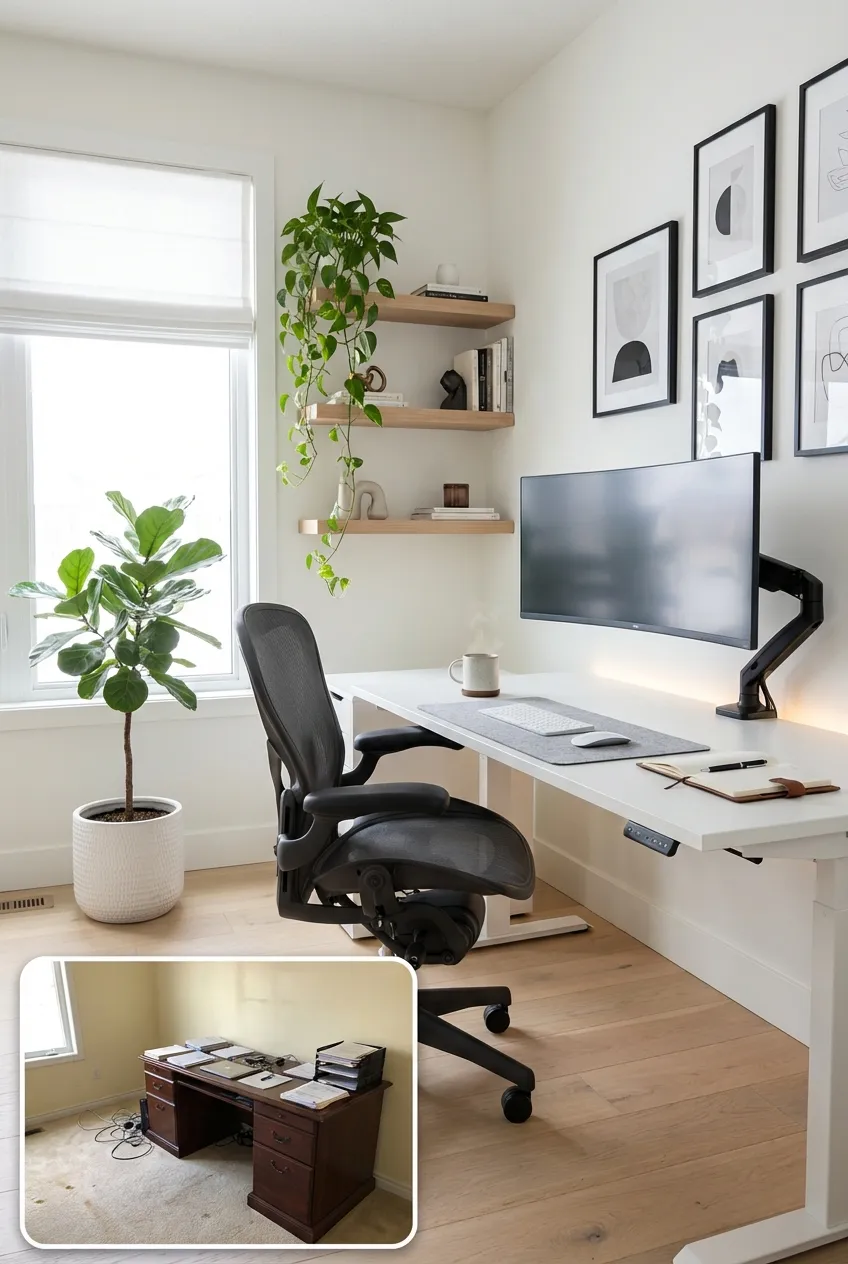
- AI generates a transformation — your room, same dimensions and windows, completely redesigned
The result isn't a generic stock photo. It's your actual space with your actual windows, your actual layout — but reimagined with professional-level design choices. New furniture placement. Better color scheme. Improved lighting. Thoughtful accessories.
And it takes seconds. Not hours. Not days. Seconds.
What AI Sees That You Don't
One of the most powerful things about AI-generated redesigns is that they often surface ideas you'd never think of yourself. We get locked into seeing our spaces a certain way — the desk has to go against that wall, the bookshelf has to stay there, the paint color can't change because we just painted two years ago.
AI doesn't have those mental constraints. It looks at your space with fresh eyes and optimizes for what the room could be, not what it currently is.
Common surprises people discover:
- The desk was facing the wrong direction. Turning it to face the window (or perpendicular to it) can transform both your mood and your video call background.
- The room can handle more color than expected. A deep navy accent wall or forest green shelving unit can add warmth and personality without overwhelming a small space.
- Floating shelves solve everything. Vertical storage frees up desk space and creates visual interest that makes the room feel designed rather than defaulted.
- Lighting was the real problem. Most home offices rely on a single overhead light. AI-generated designs consistently add task lighting, ambient lighting, and natural light optimization.
Before and After: Real Transformations
To give you a sense of what's possible, here are common home office scenarios and how AI reimagines them:
The Spare Bedroom Office
Before: Queen bed pushed to the side, desk crammed in a corner, exercise equipment, random storage boxes. After: Bed replaced with a daybed/sofa that doubles as seating for video calls. Desk repositioned to face the window. Floating shelves for storage. Clean, minimal, dual-purpose room.
The Kitchen Table Setup
Before: Laptop on the dining table, papers everywhere, kitchen clutter in the background of every Zoom call. After: A dedicated nook carved out with a slim writing desk, wall-mounted organizer, and a simple room divider or bookshelf that creates visual separation from the kitchen.
The Dark Basement Office
Before: Fluorescent overhead, dark paneled walls, no natural light, feels like a bunker. After: Light-colored walls, layered warm lighting (desk lamp, floor lamp, LED strips), large mirror to bounce light, plants for life, and a rug to add warmth underfoot.
The Too-Corporate Home Office
Before: Gray desk, black chair, monitor arm, nothing on the walls. Functional but soulless. After: Warm wood desk, comfortable upholstered chair, art on the walls, a few plants, warm-toned accessories. Still professional, but now it has personality.
Why Visualization Matters Before Buying
Here's where it gets practical. The average home office setup costs $1,500–$5,000 when you factor in a quality desk, ergonomic chair, lighting, storage, and decor. That's real money — and buying the wrong pieces means returns, wasted time, and a room that still doesn't feel right.
AI visualization lets you:
- Test styles before committing — Are you actually a mid-century modern person or did you just think you were? See it in your room and find out.
- Avoid expensive mistakes — That massive L-shaped desk might look great online but overwhelm your 10x10 room. AI shows you the proportions in context.
- Build a shopping list with confidence — Once you see a design you love, you know exactly what to look for: the style of desk, the tone of wood, the type of lighting.
- Get inspired when you're stuck — Sometimes you just need to see what's possible. AI generates options you'd never find scrolling Pinterest for hours.
The Speed Factor
Traditional interior design follows a slow path: research → mood board → floor plan → shopping → delivery → arrangement → "I don't like it" → return → repeat.
AI compresses this into seconds. You can generate five completely different design directions for your office in the time it takes to make a cup of coffee. Compare them side by side. Mix and match elements you like. Iterate instantly.
This isn't replacing the actual renovation process — you still need to buy furniture and set things up. But it eliminates the most frustrating part: figuring out what you actually want.
Your Workspace Deserves Better
You spend 8+ hours a day in your home office. That's more time than you spend in your bedroom (awake, at least). It's more time than you spend in your kitchen, your living room, or your car.
And yet, most people invest more thought into decorating their living room than the room where they actually spend most of their waking hours.
Your home office should energize you at 9 AM and comfort you at 5 PM. It should look great on camera and feel great in person. It should be a space you're proud of, not one you apologize for.
See Your Office Transformed — Right Now
Ready to see what your home office could look like?
Decorra uses AI to transform your space instantly. Snap a photo, choose a style, and watch your cluttered spare bedroom become a sleek, inspiring workspace in seconds.
No design degree required. No expensive consultations. No commitment.
Just your room, reimagined.
👉 Download Decorra free and transform your home office today
Your next video call could have a very different background. Just saying.